

Eric Metalic
Member
-
Joined
-
Last visited
7 Original Artworks
-
Description: Year: 1988 Medium: Image Area: Image Source: Original, imaged by artist Condition: Excellent
-

Tetris (Virgin) Mastertronic re-release Cover Artwork
- Artist:
In the Collection of Eric Metalic- 4 Comments
-
-
Description: Year: Medium: airbrush Image Area: Image Source: Condition: very good
-

Winzer - Starbyte - Box Cover art
- Artist:
In the Collection of Eric Metalic -
-
Description: Year: Medium: airbrush Image Area: Image Source: Condition: excellent
-
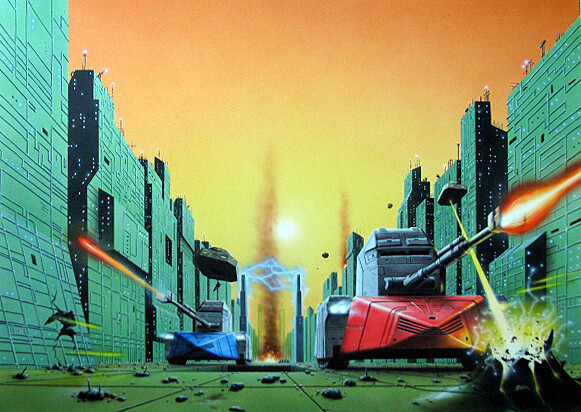
Vindicators - Domark/Tengen - Home Computers conversion Box Cover Artwork
- Artist:
In the Collection of Eric Metalic -
-
Description: Year: 1988 Medium: airbrush Image Area: Image Source: Condition: Excellent
-
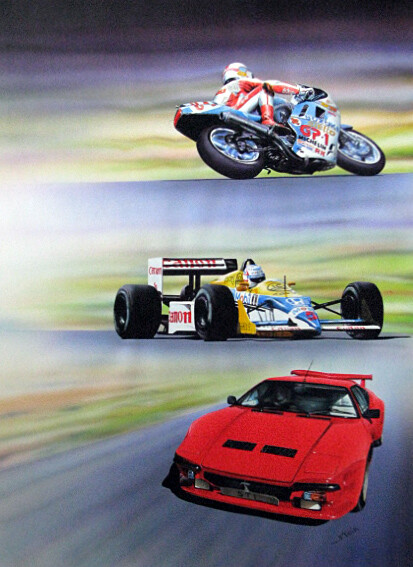
ST Action Issue 2 Cover artwork
- Artist:
In the Collection of Eric Metalic -
-
Description: Year: 1988 Medium: airbrush Image Area: Image Source: Condition: Excellent
-

ST Action Issue 3 Cover Artwork
- Artist:
In the Collection of Eric Metalic -
-
Description: Released by Atari UK for its 8-bit computer line Year: 1989 Medium: Image Area: Image Source: Condition: Excellent
-

Cygnus XI Personal Computer Box Cover Art
- Artist:
In the Collection of Eric Metalic -
-
Description: Game released on C64 and Spectrum Year: 1988 Medium: Image Area: Image Source: Condition: Excellent
-

Ring Wars Personal Computer Box art
- Artist:
In the Collection of Eric Metalic- 9 Comments
-